
If you want to figure out if a site runs on Drupal, it is a 99.99% probability that by taking a look at the /user page, Drupal—formerly laden with tabs and a form set in stone, hidden behind dark, developer magic—will reveal itself in all its glory.
The ability to modify forms was once a task only possible from a module; that really set some limitations for what themes could do in Drupal 6. In Drupal 7 the power to modify forms the same way as modules has been bumped down to the theme layer, and for that we sure are pleased: Let us now put this newfound power to good use and deDrupalize the login form.
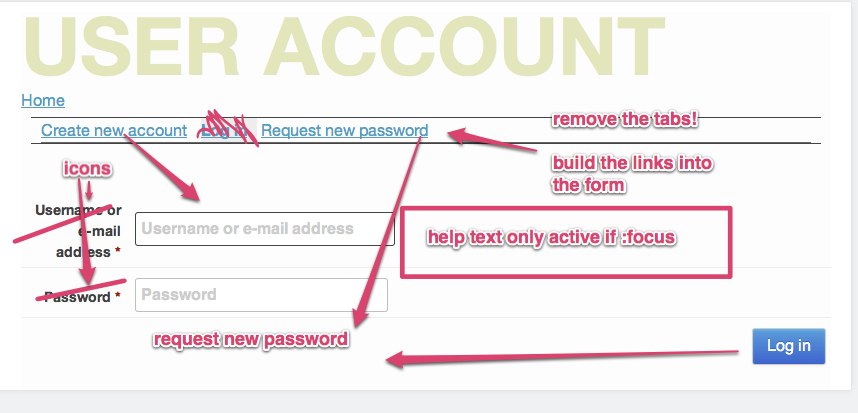 Here is the battle plan:
- Remove the tabs from the login page and insert them where they would make sense in a login form.
- Use icons instead of the long username/password descriptions and still make it accessible. (Use HTML5 to add placeholders to the forms fields.)
- Hide the helper text until the user activates the field—with a little advanced css selector magic.
- Make it all easily reusable for other forms by putting it all in a class, and inject that class with the preprocessor.
- Change the title for the user pages so they make sense.
template.php is your backstage pass to awesomeness.
The template.php file in your theme will be the place where all the fun is going to happen -- yes, it is code, and a little bit dangerous.
Lets start slowly, fix the titles, and, because we're not going to use them anymore, remove the tabs on the user login, password request, and register page.
Fix the Titles
With the power of the API let’s fiddle with the title and get it to make sense for the user:
/*-
USER ACCOUNT
Removes the tabs from user login, register & password
Also fixes page titles
*/
switch (current_path()) {
case 'user':
$vars[title] = t('Login');
unset($vars[tabs]);
break;
case 'user/register':
$vars[title] = t('New account');
unset($vars[tabs]);
break;
case 'user/password':
$vars[title] = t('DOH! I forgot my password');
unset($vars[tabs]);
break;
default:
# code...
break;
}
This code is simple: check on the page for the path if the path is one of our three user pages.
$vars[title] = t('DOH! I forgot my password'); <- fix title
unset($vars[tabs]); <- remove the tabs
break;
Links in the Form
Before the form API came into the theme layer, doing this would require obscure css—which would turn your hair gray. Fortunately, this is now a simple task—inserting it somewhere into some markup might seem lots simpler, but that’s not how Drupal works.
&$form, &$form_state, $form_id) {
// add a <b><href=”login-register”>.... before the name
$form['name']['#prefix'] =
'<b>' . l(t('Register a new account'), 'user/register', array('attributes' => array('class' => 'login-register', 'title' => t('Create a new user account')))) . '</b>';
//place forgotten password link after the password field
$form['pass']['#suffix'] = '<b>' . l(t('Forgot password?'), 'user/password', array('attributes' => array('class' => 'login-password', 'title' => t('Get a new password')))) . '</b>';
}
The idea is, we are looking for the two form fields we want to add the links to (name and password).
HTML5 Power Input, Placeholders, and Visual Goodies
In HTML5 we can add helper text inside form fields as a placeholder. This opens up new design possibilities, and there is no need to add JS or perform secret background tricks. (Learn more in the article Drupal 7, Meet 2012's HTML.)
....
//add placeholder
if (!empty($element['#title']) {
$element['#attributes']['placeholder'] = $element['#title'];
}
….
}
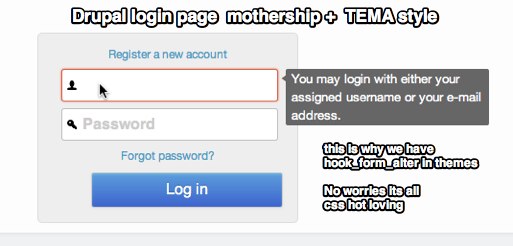 The text field in the forms will now be added to the placeholder attribute so it will print out as:
When the label value is added to the placeholder, we can make the form more user-friendly by adding icons instead of lengthy text descriptions,
removing the labels, and placing the icons into the form fields.
CSS:
display:inline-block;
text-indent:-999em;
width:0
}
Labels are now invisible but still accessible for screen readers.
text-indent:0em;
width:auto;
}
To add icons:
background: #fff url(../icon/user.png) no-repeat 5px center;
}
input[type="password"]{
background: #fff url(../icon/key.png) no-repeat 5px center;
}
input[type="email"], input[name="conf_mail"]{
background: #fff url(../icon/email.png) no-repeat 5px center;
}
Tooltip CSS
… hide position absolute -xxxx
}
input:focus ~ div.description{
//activate the description field when the input field is in focus - nifty!
}
Add Tooltips to the forms.
Instead of filling up our css with repeating classes, we can add this .tooltip class to the forms that need this.
function THEMENAME_form_alter(&$form, &$form_state, $form_id) {
if ($form_id == "user_login"){ //<- check for the login form
$form['#attributes']['class'] = "tooltip"; // add a class to the form
}
elseif ($form_id == "user_register_form") {
$form['#attributes']['class'] = "tooltip";
}
elseif ($form_id == "user_pass") {
$form['#attributes']['class'] = "tooltip";
}
elseif ($form_id == "user_login_block") {
$form['#attributes']['class'] = "tooltip";
}
}
We now have a completely redesigned form based on the most powerful Drupal APIs there are.
The complete example code can be found at: https://github.com/mortendk/De-Drupalizing-the-Login-Form
The mothership Theme that is dedicated to simplifying & cleaning up Drupal's markup to a modern standard, comes with the de drupalized login form in its goodie bag.
Comments
Hey MortenDK,
I really liked your post about login form, but url to github (https://github.com/mortendk/De-Drupalizing-the-Login-Form) is not really working. Would be nice to see complete code.
By the way, do you have any working example sites with this kind of theming applied to user page login form. Thanks again!
THEMENAME_preprocess_page from first piece of code is missing &$vars argument, should be THEMENAME_preprocess_page(&$vars)
greets
isilweo
Hey Morten,
Your git project isn't showing up. Do you know when it'll be public / available again?
By the way, thanks for the great article.
Hi, I'm wondering about the code too. I don't know php to write it myself but am very grateful for code I can use. Thank you.
Thank you for this great tutorial.
As the code is not available on github, could you mail me the code. This would be great.
Regards,
Stéphane
Some of the code snippets from Morten are wrong. I fixed the code and added my own twist, you can check the gist at https://gist.github.com/hachesilva/5074044
I've taken the ideas expressed in this article as well as some from a newer 'The God Login' article and created a Drupal 7 module called Super Login. If anyone is interested it can be found here: https://www.drupal.org/project/super_login
Summary article is here: https://3cwebservices.com/drupal/introduction-super-login-module-drupal-7